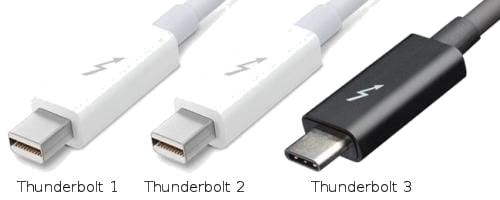
The Thunderbolt interface was jointly developed by Intel and Apple. Since its official release, it has gone through three iterations. Thunderbolt 1 and Thunderbolt 2 used Mini-DP interfaces (used in older MacBooks), while Thunderbolt 3 switched to the more advantageous USB Type-C interface, integrating PCI Express, DisplayPort and other technologies.
Transmission Rates
- Thunderbolt 1: 10 Gbps
- Thunderbolt 2: 20 Gbps
- Thunderbolt 3 and 4: 40 Gbps
These Thunderbolt interfaces are widely used in high-end notebooks such as the MacBook and ThinkPad X1 to connect peripherals such as external displays, external graphics cards, external docking stations and external hard drive enclosures.
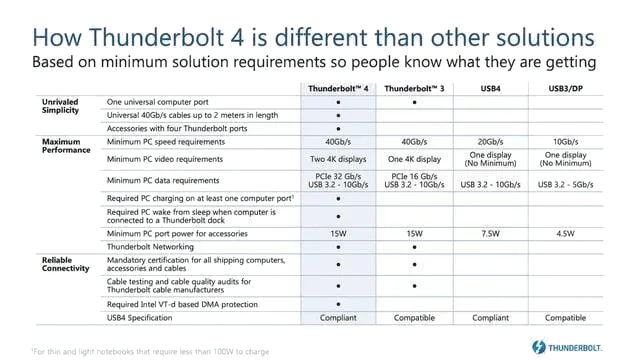
Intel has officially released the Thunderbolt 4 interface standard. Compared with the previous-generation Thunderbolt 3, the improvement is not very obvious—the bandwidth is still 40 Gbps, and the changes are mostly compatibility upgrades. Four differences — the new generation versus the previous one — are outlined below.
1. Display Support
Thunderbolt 3 supported 4K video output but only a single 4K display, which was unfriendly to users who wanted two or more 4K screens. Thunderbolt 4 enhances the video transmission requirement: to gain Thunderbolt 4 certification, the interface must support at least two 4K displays or one 8K display. This is a very useful upgrade for graphic designers who work on laptops.
2. PCIe Data Transmission Speed
To pass Thunderbolt 3 certification, the PCIe data transmission speed had to be at least 16 Gbps. This was a headache for some external graphics card users, because if the interface didn't fully deliver Thunderbolt 3 speeds, external graphics card performance would be greatly reduced. Thunderbolt 4 raises the PCIe data certification starting point to 32 Gbps—equivalent to PCIe 3.0 x4—which can basically meet the external needs of some high-end graphics cards.
3. Security
Thunderbolt 3 interface security was average and could not stop DMA attacks. Intel added Intel VT-d-based Direct Memory Access (DMA) protection to Thunderbolt 4 certification to avoid physical DMA attacks, improving interface security to some extent—though it is of little use to the average user.
"Thunderbolt compatible" is not "Thunderbolt certified"
This distinction is where sourcing goes wrong most often, and it is worth being blunt about it — including about our own products.
Thunderbolt certification is issued by Intel. A cable that carries the Thunderbolt logo has been through Intel's programme. USB-IF certification is a separate programme covering USB4. Because Thunderbolt 3 and 4 are built on the same 40 Gbps signalling as USB4, a USB4-certified cable will generally work with Thunderbolt devices — but "will work with" and "is certified for" are different statements, and only one of them is a document.
Our two 40 Gbps cables sit on the USB-IF side of that line:
| Model | Standard | Power | Certification |
|---|---|---|---|
| PF587A — 0.8 m | USB4 Gen3, 40 Gbps (Thunderbolt 3 compatible) | 100 W | USB-IF certified, TID 6801 |
| PLT588 — 2 m | USB4, 40 Gbps (Thunderbolt 4 compatible) | 240 W, PD 3.1 | E-Marker; not USB-IF certified |
Neither carries Intel Thunderbolt certification, and we do not describe them as Thunderbolt cables. If your project requires the Thunderbolt logo on the product, that is an Intel programme and the supplier must show you that specific certification — a USB-IF TID does not substitute for it.
What to ask, for any 40 Gbps cable: which certification exactly, issued by whom, and what is the number? Anything less than all three is a marketing statement.
Both cables are listed under USB-C cables.
4. Sleep Wake-Up
If a Thunderbolt 4 interface is connected to a docking station and the keyboard and mouse are connected to that dock, Thunderbolt 4 allows the computer to be woken from sleep by the keyboard and mouse—just as we wake a screen by tapping the keyboard or clicking the mouse.
In addition, Thunderbolt 4 supports docking stations with up to four Thunderbolt 4 ports, PCs can be charged on at least one computer port, and it can reach a nominal speed of 40 Gbps over a 2-meter universal cable. The Thunderbolt 4 interface debuted as an early addition to Intel's 11th-generation Tiger Lake mobile processors. (The above data is current up to September 2020 and is for reference only; the ranking does not imply any order.)