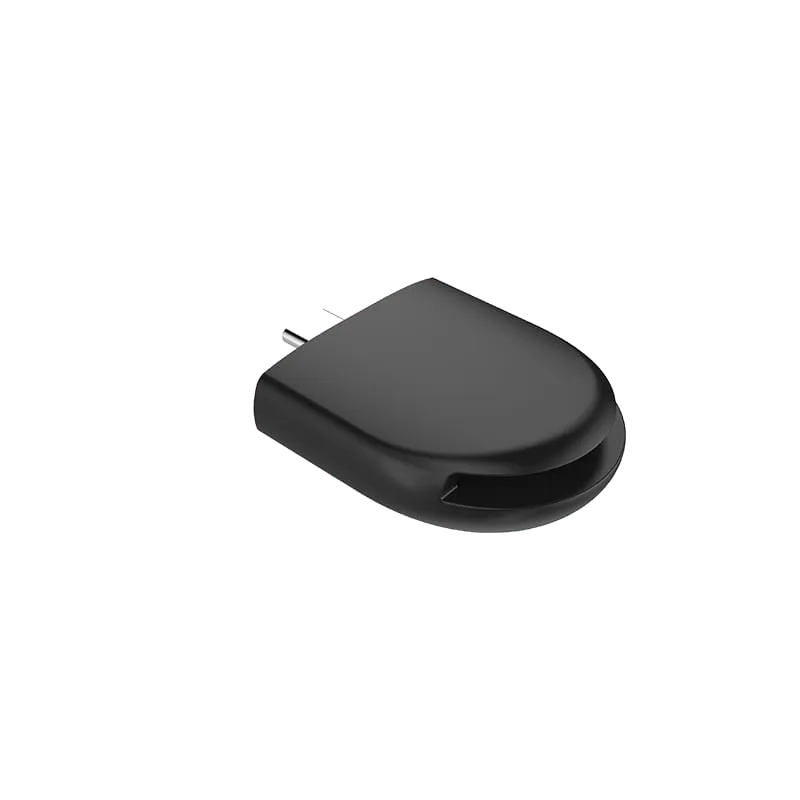
Single Port Converter
USB C to SD Card Reader - PF048
USB-C SD card reader compatible with UHS-I and SD 3.0, with transfer rates up to 104MB/s. Plug-and-play, no drivers needed.
Overview
The PF048 is a USB-C SD card reader that lets you read SD cards directly on USB-C laptops, phones and tablets. It is compatible with the UHS-I and SD 3.0 standards, delivering transfer rates up to 104MB/s. Built with an ABS housing and a nickel-plated connector, it works plug-and-play with no drivers required.
Specifications
| Spec | Value |
|---|---|
| Model / Code | PF048 |
| Cable Material | ABS |
| Cable Color | Black |
| Shell Material | ABS |
| Input Connector | USB C |
| Connector Plating | Nickel Plated |
| Card Reader | SD 3.0, UHS-I compatible |
| Transfer Rate | Up to 104MB/s |
| Installation | Plug and play, no drivers |
| What's in the Box | Adapter x1 |
Frequently Asked Questions
- Is the PF048 compatible with my device?
- The PF048 works with any USB-C enabled laptop, phone, or tablet. It requires no drivers—simply plug in and use.
- What transfer speeds can I expect?
- The PF048 supports UHS-I and SD 3.0 standards, delivering transfer rates up to 104MB/s.
- What materials are used in the PF048?
- The housing and cable are made from durable ABS plastic, with a nickel-plated USB-C connector for reliable connections.
- Do I need to install drivers?
- No. The PF048 is plug-and-play—no driver installation required.
- What's included in the box?
- Each PF048 package includes one adapter unit.
Related Products
-
-
-
-
-
-
-
-
Sourcing guides
- How to Choose Single Port Adapters: A B2B Sourcing GuideSingle port adapters convert one video or display connector type to another, enabling legacy and modern devices to work together. This guide compares HDMI, DisplayPort and Mini DisplayPort adapter options from Tonetron to help you select the right model for your application, resolution needs and budget.
- HDMI vs USB-C vs DisplayPort: Which Is Better for Monitors?A monitor usually ships with two different video cables, and the port you pick changes what the screen can actually do. This compares HDMI, DisplayPort and USB-C on bandwidth, refresh rate, daisy-chaining and power delivery, and says which to specify for media, for gaming and for a single-cable desk setup.
Get a Quote
MOQ from 1,000 pcs · free samples in 3 days · everything negotiable.