Single Port Converter
USB C to HDMI 4K/60Hz Adapter - PF500
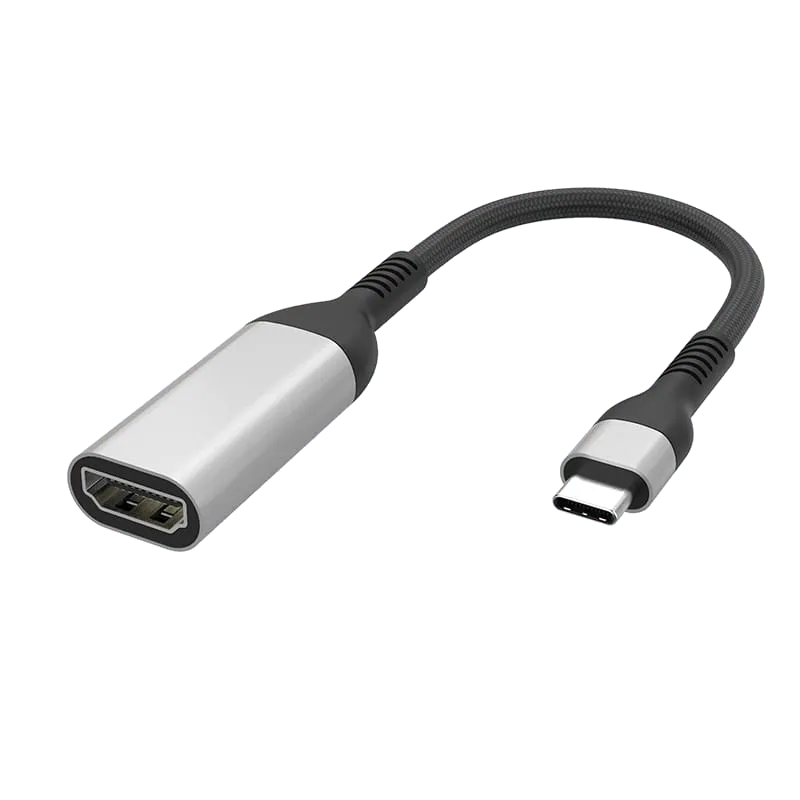
USB-C to HDMI adapter running the full 4K@60Hz — double the frame rate of the 4K@30Hz models, with aluminium shell and nylon-braided cable with reinforced strain relief.
Overview
The PF500 is the 4K@60Hz model in this range, and that single figure is the reason to specify it over the 4K@30Hz PF403 or WG403.
At 4K@30Hz a still image is indistinguishable, which is why 30Hz is perfectly adequate for slides, signage and spreadsheets. The difference appears the moment anything moves. Dragging a window, scrolling a document or moving a cursor at 30Hz shows visible stepping, and video and gameplay judder. 4K@60Hz doubles the refresh rate and removes that — it is what makes a 4K panel usable as a working desktop rather than a display surface, and it is normally a hard requirement for video playback, demo stands and any room where the screen shows motion.
The cable is polypropylene-woven with a nylon braid and reinforced SR strain relief, so the build tolerates being carried and re-plugged rather than only installed once. Housing is aluminium with nickel-plated contacts and OFC high-purity oxygen-free copper conductors. Output is one HDMI port, plug and play with no drivers. The box contains one adapter.
Braid colour, cable length, printed branding and retail packaging are customisable for OEM/ODM orders.
Specifications
| Spec | Value |
|---|---|
| Model / Code | PF500 |
| Cable Material | Polypropylene weaving |
| Cable Color | Black |
| Shell Material | Aluminum shell |
| Input Connector | USB C |
| Connector Plating | Nickel Plated |
| Conductor | OFC high-purity oxygen-free copper |
| Cable Jacket | Nylon braided with reinforced SR |
| Max Resolution | 4K@60Hz |
| Output | 1x HDMI |
| Installation | Plug and play, no drivers |
| What's in the Box | Adapter x1 |
Frequently Asked Questions
- What is the key difference between the PF500 and the PF403?
- The PF500 outputs 4K@60Hz, while the PF403 is limited to 4K@30Hz. At 60Hz, motion is smooth for video, gaming and active desktop use. At 30Hz, scrolling and window dragging show visible stepping, making it suitable only for static content like slides and signage.
- What connectors and output does the PF500 have?
- It has USB C input and one HDMI output. No drivers are required—it is plug and play compatible with any USB C device.
- What materials are used in the PF500 cable and connectors?
- The cable features polypropylene weaving with nylon braiding and reinforced SR strain relief. The shell is aluminum with nickel-plated connectors and OFC high-purity oxygen-free copper conductors for durability and signal integrity.
- Can the PF500 be customized for OEM/ODM orders?
- Yes. Braid colour, cable length, printed branding and retail packaging are all customizable for OEM/ODM buyers.
- What is included in the box?
- One PF500 adapter.
Related Products
-
-
-
-
-
-
-
-
Sourcing guides
- How to Choose Single Port Adapters: A B2B Sourcing GuideSingle port adapters convert one video or display connector type to another, enabling legacy and modern devices to work together. This guide compares HDMI, DisplayPort and Mini DisplayPort adapter options from Tonetron to help you select the right model for your application, resolution needs and budget.
- HDMI vs USB-C vs DisplayPort: Which Is Better for Monitors?A monitor usually ships with two different video cables, and the port you pick changes what the screen can actually do. This compares HDMI, DisplayPort and USB-C on bandwidth, refresh rate, daisy-chaining and power delivery, and says which to specify for media, for gaming and for a single-cable desk setup.
Get a Quote
MOQ from 1,000 pcs · free samples in 3 days · everything negotiable.