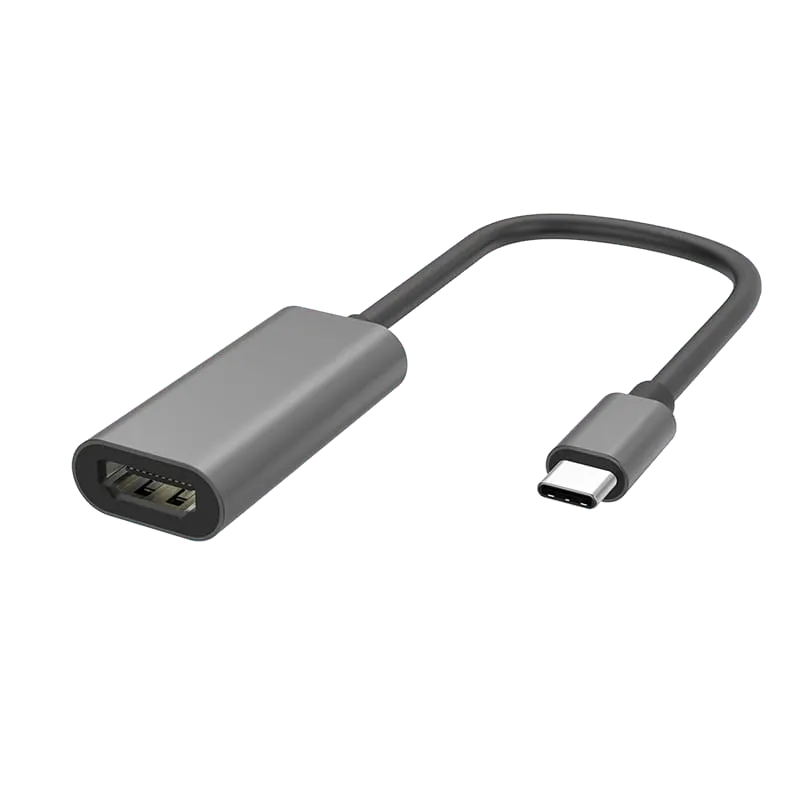
Single Port Converter
USB C to HDMI 4K/30Hz Adapter - WG403
USB-C to HDMI adapter, 4K@30Hz, with a reversible USB-C plug and a soft TPE cable — the flexible, lower-profile build for desks and fixed setups.
Overview
The WG403 outputs a single HDMI signal from a USB-C port at up to 4K@30Hz, plug and play with no drivers.
Its distinguishing feature is a TPE cable rather than a braided one. TPE stays supple and does not stiffen the way a braided or PVC jacket can, so the adapter coils tightly, sits flat behind a monitor and puts less leverage on the laptop port when it hangs. For a desk, a meeting-room table or a fixed installation — anywhere the adapter is plugged in and left rather than carried daily — that flexibility is worth more than abrasion resistance. Where the adapter does travel every day, the nylon-braided PF403 in the same range is the harder-wearing choice.
The USB-C plug is reversible and seats either way up, which matters on a connector that is often plugged in blind at the side or rear of a laptop.
4K@30Hz suits presentations, signage and desktop work on a 4K panel; the PF500 covers 4K@60Hz where smoother motion is needed. The housing is aluminium with nickel-plated contacts and OFC high-purity oxygen-free copper conductors. The box contains one adapter.
Cable colour, length, printed branding and retail packaging are customisable for OEM/ODM orders.
Specifications
| Spec | Value |
|---|---|
| Model / Code | WG403 |
| Cable Material | TPE |
| Cable Color | Black |
| Shell Material | Aluminum shell |
| Input Connector | USB-C (reversible) |
| Connector Plating | Nickel Plated |
| Conductor | OFC high-purity oxygen-free copper |
| Max Resolution | 4K@30Hz |
| Output | 1x HDMI |
| Installation | Plug and play, no drivers |
| What's in the Box | Adapter x1 |
Frequently Asked Questions
- What resolution and refresh rate does the WG403 support?
- The WG403 outputs up to 4K@30Hz via HDMI from a USB-C port. It is plug and play with no driver installation required.
- What makes the TPE cable better than braided alternatives?
- TPE cable stays supple and coils tightly without stiffening, making it ideal for fixed installations where the adapter remains plugged in. It sits flat behind monitors and reduces leverage stress on laptop ports compared to braided or PVC jackets.
- Can the USB-C connector be plugged in either way?
- Yes, the USB-C plug is fully reversible and seats either way up, making it convenient for blind plugging at laptop sides or rear ports.
- What materials are used in the WG403 construction?
- The adapter features an aluminum shell with nickel-plated contacts and OFC high-purity oxygen-free copper conductors for reliable performance.
- Are customization options available for bulk orders?
- Yes, cable color, length, printed branding and retail packaging are customizable for OEM/ODM orders. Contact Tonetron for customization details.
Related Products
-
-
-
-
-
-
-
-
Sourcing guides
- How to Choose Single Port Adapters: A B2B Sourcing GuideSingle port adapters convert one video or display connector type to another, enabling legacy and modern devices to work together. This guide compares HDMI, DisplayPort and Mini DisplayPort adapter options from Tonetron to help you select the right model for your application, resolution needs and budget.
- HDMI vs USB-C vs DisplayPort: Which Is Better for Monitors?A monitor usually ships with two different video cables, and the port you pick changes what the screen can actually do. This compares HDMI, DisplayPort and USB-C on bandwidth, refresh rate, daisy-chaining and power delivery, and says which to specify for media, for gaming and for a single-cable desk setup.
Get a Quote
MOQ from 1,000 pcs · free samples in 3 days · everything negotiable.