1. Different Manufacturers
HDMI is dominated by TV manufacturers, while DP is developed by a consortium of PC and chip manufacturers. Note that HDMI requires a licensing fee, whereas DP does not.
2. Version Evolution
The HDMI interface can transmit audio and video signals at the same time. The differences between versions are as follows:
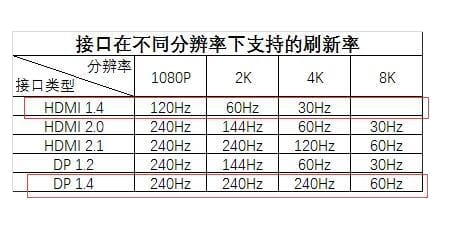
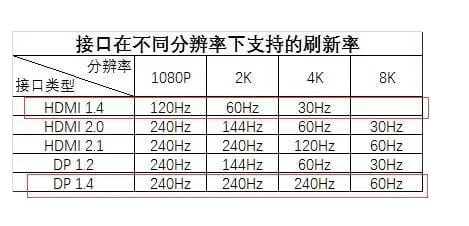
- HDMI 1.4 has a maximum bandwidth of 10.2 Gbps, theoretically supporting 1080P 144Hz, 2K 75Hz, 3840x2160/30Hz and 4096x2160/24Hz.
- HDMI 2.0 has a maximum bandwidth of 18 Gbps and supports 1080P 240Hz, 2K 144Hz, 4K 60Hz and 5K 30Hz.
- HDMI 2.1 has a maximum bandwidth of 48 Gbps and supports 2K 240Hz, 4K 144Hz, 5K 60Hz and 8K 30Hz.
For the DP interface:
- The first generation of DP reached 10.8 Gbps of bandwidth.
- DP 1.2 bandwidth reaches up to 21.6 Gbit/s.
- DP 1.4 bandwidth reaches 32.4 Gbps and adds DSC (Display Stream Compression) technology, supporting 240Hz at 4K and 60Hz at 8K.
How each side's claims can be verified
HDMI and DisplayPort are governed by different bodies, and — importantly for sourcing — they offer different amounts of independently checkable evidence.
HDMI: an ATC certificate with a number you can check
HDMI cables can be tested at an HDMI Forum Authorized Test Center (ATC) against a specific Compliance Test Specification (CTS) revision. The confirmation carries a certificate number.
The distinction that costs buyers money: the CTS revision moves independently of the HDMI version number. "HDMI 2.1 certified" without a CTS revision and a date does not say which test suite the sample passed.
| Certificate # | Model | CTS | Issued |
|---|---|---|---|
| 5QSIMQP4DLG | PF331S-0300 — 3 m | 2.1b | 2023-03-10 |
| 2JCHSF3SL1X | PF331A-0300 — 3 m | 2.1a | 2021-06-12 |
| MG3CQ3Z4BAG | TT-1.8-2.1 — 1.8 m | 2.1a | 2021-03-04 |
DisplayPort: VESA certification, and what we do not hold
DisplayPort compliance is administered by VESA, which runs its own certification programme and publishes certified products. We do not hold VESA DisplayPort certification, and we would rather say so than let our HDMI certificates imply coverage we do not have.
What that means practically: if DisplayPort certification is a requirement for your project, ask any supplier — us included — for the VESA certification record specifically, not a general statement about "DP support". A cable that carries DisplayPort Alt Mode over USB-C is a third case again, governed by the USB-IF side.
Certified HDMI cables are under HDMI cables; full certificate details are on our certifications page.
3. Widespread Range
HDMI interface: At present, smart TVs and their auxiliary equipment (set-top boxes, game consoles, notebooks, digital cameras, etc.) are almost all equipped with HDMI, making it very widely used. In addition, the mainstream PS4 and Xbox game consoles use the HDMI interface.
DP connection: Mainly popular in the PC field. In addition, AMD's Eyefinity multi-screen splicing technology requires the DP interface.
HDMI vs DisplayPort at a glance
The two standards overlap on most modern displays, so the practical question is not which is "better" but which fits the device and the resolution you are driving. This table compares the versions in wide use today.
| HDMI 2.1 | DisplayPort 1.4 | DisplayPort 2.1 | |
|---|---|---|---|
| Max bandwidth | 48 Gbps | 32.4 Gbps (HBR3) | 80 Gbps (UHBR20) |
| 4K refresh | 4K120 | 4K120 (with DSC) | 4K240+ |
| 8K support | 8K60 | 8K30 (8K60 with DSC) | 8K85+ |
| Passive cable length | ~3 m at full 48 Gbps | ~2 m at HBR3 | ~1 m at UHBR20 |
| Connector lock | Friction fit | Latching clip | Latching clip |
| Best for | TVs, consoles, AV receivers, eARC audio | PC monitors, docking, multi-display | High-refresh gaming and pro displays |
In short: pick HDMI when the far end is a television, a games console or an AV receiver, because those devices standardise on it and HDMI carries eARC audio back to a soundbar. Pick DisplayPort for PC monitors and multi-monitor setups, where the latching connector and higher refresh headroom matter, and where a docking station is likely to output DisplayPort over USB-C Alt Mode. Where a run must serve both, two cables beat one active adapter — conversion adds cost and a failure mode your customer will blame on the cable.