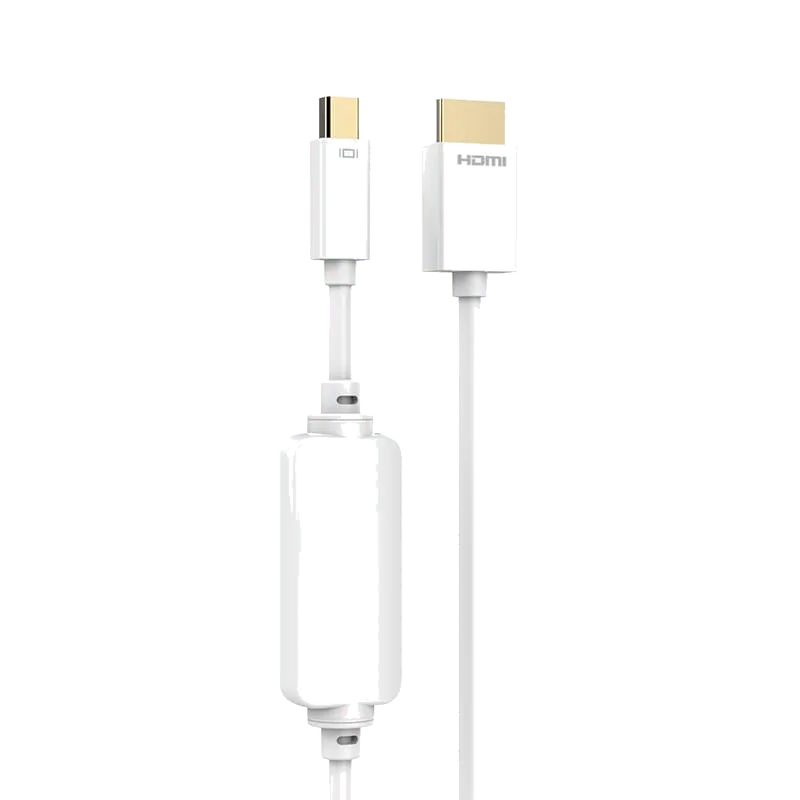
DisplayPort Cable
MiniDP to HDMI A 1080P Cable - MP340
2-meter Mini DisplayPort to HDMI cable delivering up to 1080P@60Hz audio and video from a Mini DP source to a display, projector or TV.
Overview
The MP340 is a 2-meter Mini DisplayPort to HDMI cable that carries both audio and video from a Mini DP source to a display, projector or television. It outputs up to 1080P@60Hz resolution and follows the HDMI 1.4 standard. Note that audio output depends on the receiving display supporting sound; otherwise only the video picture is transmitted. The cable uses an ABS housing, a 24K gold-plated connector and an OFC high-purity oxygen-free copper conductor, removing the need for a separate HDMI cable.
Specifications
| Spec | Value |
|---|---|
| Model / Code | MP340 |
| Cable Material | PVC |
| Cable Color | White |
| Shell Material | ABS |
| Input Connector | Mini DisplayPort |
| Connector Plating | 24K Gold Plated |
| Conductor | OFC high-purity oxygen-free copper |
| Max Resolution | 1080P@60Hz |
| Output | 1x HDMI |
| Standard | HDMI 1.4 |
| Length | 2 m |
| What's in the Box | Cable x1 |
Frequently Asked Questions
- What resolutions and refresh rates does the MP340 support?
- The MP340 supports up to 1080P@60Hz output and conforms to HDMI 1.4 standard for reliable video transmission to displays, projectors, or televisions.
- Does this cable carry audio as well as video?
- Yes, the MP340 carries both audio and video from the Mini DisplayPort source. Audio output depends on the receiving display supporting sound; if not supported, only video is transmitted.
- What materials and connectors are used in the MP340?
- The cable features a PVC jacket, ABS housing, 24K gold-plated connectors, and OFC high-purity oxygen-free copper conductors for durability and signal quality.
- What length is the MP340 cable?
- The MP340 is 2 meters long, providing adequate reach for most desktop and home theater setups.
- Can I use the MP340 as a standalone solution without a separate HDMI cable?
- Yes, the MP340 integrates Mini DisplayPort input with HDMI output in a single cable, eliminating the need for an additional HDMI cable.
Related Products
Sourcing guides
- HDMI vs DisplayPort: Which Should I Use for My PC Monitor?Almost every monitor has both ports, and for a PC the right one is usually DisplayPort: it carries Adaptive-Sync natively, runs the monitor's top refresh rate, and can daisy-chain. HDMI earns its place when a console, TV or soundbar shares the screen. Here is how to decide, and what to write on a cable spec.
- HDMI vs USB-C vs DisplayPort: Which Is Better for Monitors?A monitor usually ships with two different video cables, and the port you pick changes what the screen can actually do. This compares HDMI, DisplayPort and USB-C on bandwidth, refresh rate, daisy-chaining and power delivery, and says which to specify for media, for gaming and for a single-cable desk setup.
- B2B Cable Sourcing FAQ: MOQ, OEM/ODM, Certifications and Private-Label PackagingA practical FAQ for procurement teams sourcing HDMI, USB-C and custom cables directly from a factory in China — covering minimum order quantity, samples, OEM vs ODM, certification documents, private-label packaging and lead times.
Get a Quote
MOQ from 1,000 pcs · free samples in 3 days · everything negotiable.