Why USB Cable Selection Matters for Your Business
Selecting the correct USB cable specification prevents device incompatibility, data loss, and costly field replacements. Whether you are specifying cables for retail products, OEM integration, or industrial equipment, the wrong cable type will either fail to fit or operate at reduced speed with no error message—frustrating end users and damaging your brand.
This guide walks you through the key decision points: standard (USB 2.0 vs 3.0), connector type (Type-A, Type-B, Type-C), and material quality. It also explains how Tonetron, a Dongguan-based ISO 9001 certified manufacturer and USB-IF member, can support your cable sourcing from prototyping through mass production.
USB 2.0 vs USB 3.0: Speed and Backward Compatibility
| Feature | USB 2.0 | USB 3.0 |
|---|---|---|
| Data Speed | 480 Mbps | Up to 5 Gbps |
| Best For | Printers, keyboards, MIDI, audio interfaces, low-bandwidth sensors | External drives, docking stations, high-speed KVM switches, data-intensive backup |
| Backward Compatibility | Works with USB 3.0 ports at USB 2.0 speeds | Works with USB 2.0 ports but operates at USB 2.0 speed |
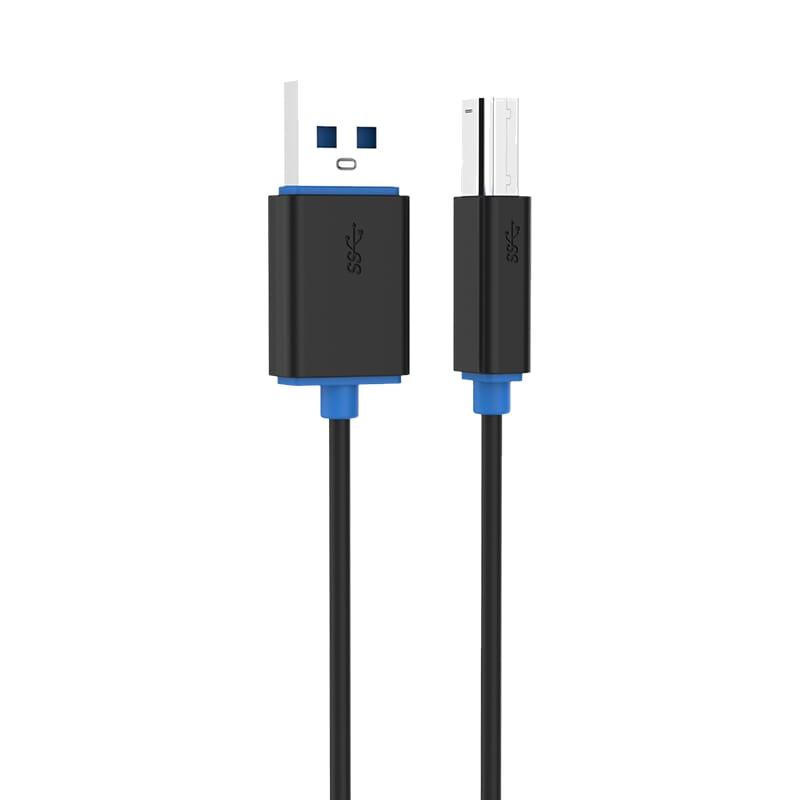
| Connector Durability | Lower contact count, less complex | Additional contact block for speed signals; Type-B is physically taller and incompatible with USB 2.0 Type-B sockets |
| Cable Cost | Lower | Higher due to additional conductor pairs |
Key takeaway: USB 3.0 cables will work in USB 2.0 ports and vice versa (except Type-B), but they will operate at the slower standard. If your device was designed for USB 3.0, using a USB 2.0 cable will silently degrade performance.
USB Connector Types Explained
USB Type-A (Host Connector)
The rectangular connector found on computers, hubs, and wall chargers. Always plugs into the host device or power source.
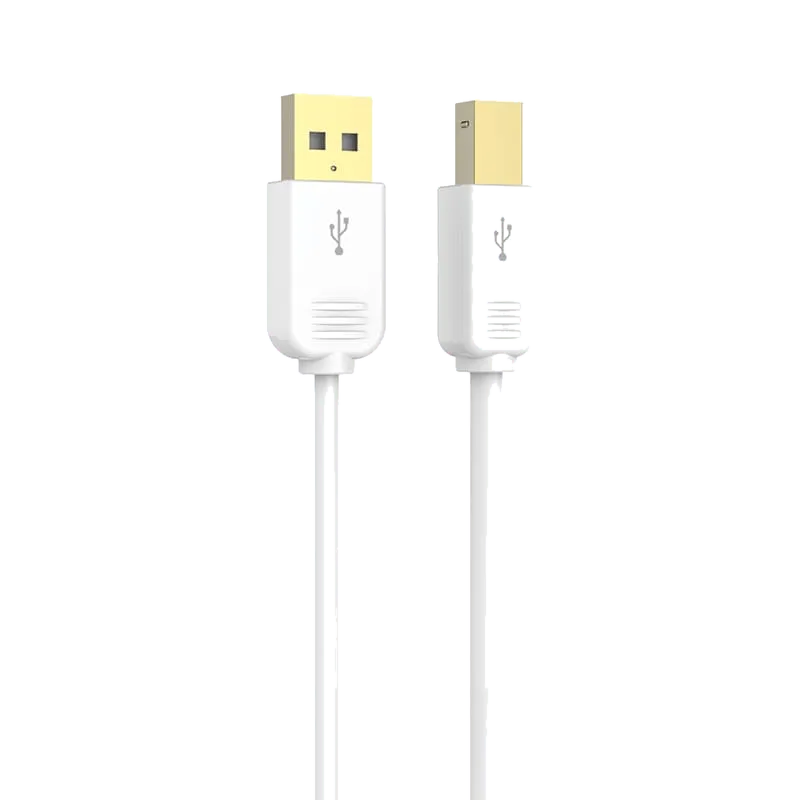
- Type-A to Type-B: Standard for printers, scanners, external drives, audio interfaces, MIDI keyboards, and studio equipment. Tonetron offers USB 2.0 (Model MP366, PB466) and USB 3.0 (Model PB460) versions.
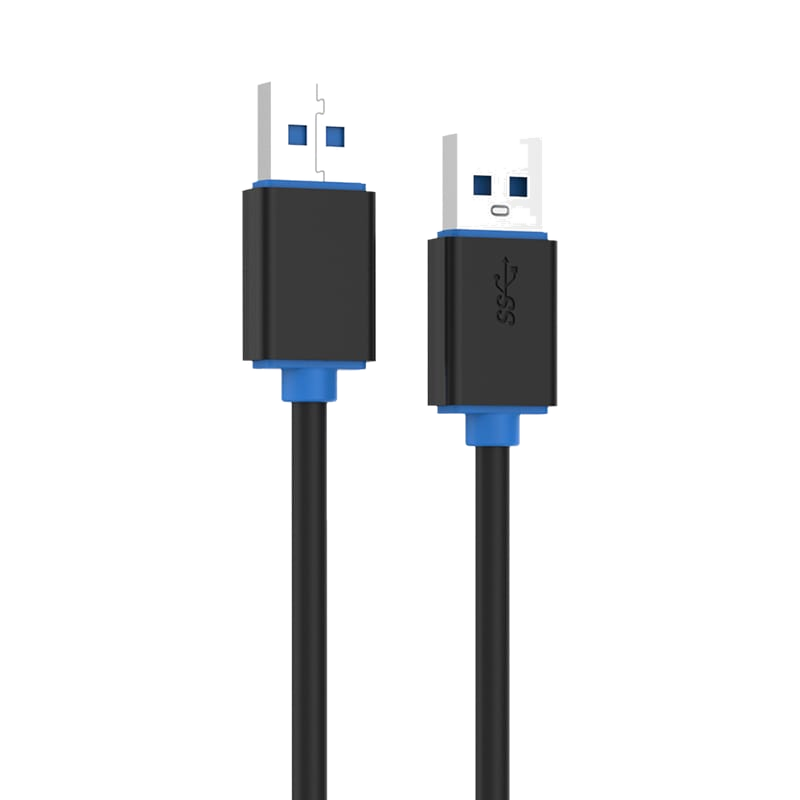
- Type-A to Type-A: Specialized connector for KVM switches, industrial HMI systems, docking stations, and data-transfer bridges. Never use for direct computer-to-computer connection. Available in USB 2.0 (Model PB469) and USB 3.0 (Model PB459).
USB Type-C (Reversible Connector)
The small, oval connector used in modern laptops, phones, and tablets. Plugs in either direction for user convenience. Tonetron's Model PB485 (USB 3.0 Type-C to Type-A) and Model PB489 (USB-C OTG cable with 5 Gbps data speed) support both legacy USB-A peripherals and modern USB-C hubs.
Tonetron USB Cable Product Overview
| Model | Connector | Standard | Key Features | Typical Application |
|---|---|---|---|---|
| MP366 | Type-A to Type-B | USB 2.0 | 24K gold-plated, OFC copper, white ABS housing | Printers, external storage, mobile hard disks |
| PB466 | Type-A to Type-B | USB 2.0 | Black PVC, molded connectors, no seams | Printers, scanners, audio interfaces, MIDI equipment |
| PB460 | Type-A to Type-B | USB 3.0 | Black PVC, molded connectors, SuperSpeed rated | Docking stations, external SSDs, capture devices |
| MP369 | Type-A to Type-A | USB 2.0 | 24K gold-plated, OFC copper, white ABS housing | Laptop coolers, USB switches and distributors |
| PB469 | Type-A to Type-A | USB 2.0 | Black PVC, molded connectors | KVM switches, industrial control panels, HMI systems |
| PB459 | Type-A to Type-A | USB 3.0 | Black PVC, molded connectors, SuperSpeed rated | USB 3.0 KVM switches, docking stations, drive enclosures |
| PB485 | Type-C to Type-A | USB 3.0 | Black PVC, molded connectors, reversible USB-C | Laptop-to-legacy peripheral, external drives |
| PB489 | Type-C to Type-A | USB 3.0 (5 Gbps) | OFC copper, molded shell, plug-and-play | USB-C devices to USB 3.0 peripherals (OTG) |
Quality and Material Considerations
Connector Materials
- Gold-Plated Connectors (MP366, MP369): 24K gold plating reduces oxidation and improves signal integrity over time. Recommended for retail products with extended shelf life and frequent use.
- Molded Connectors (PB459, PB460, PB466, PB469, PB485, PB489): One-piece molded housing eliminates seams and distributes strain evenly along the cable, improving durability and reducing connector fractures.
Cable Jacket Materials
- PVC (Polyvinyl Chloride): Standard cable insulation material. Flexible, cost-effective, and suitable for most indoor and office environments.
- OFC Oxygen-Free Copper Conductors: Higher purity conductors (used in MP366, MP369, PB489) reduce signal loss and improve data integrity, particularly important for long cable runs or noise-sensitive audio/video applications.
Shell Housing
- ABS (Acrylonitrile Butadiene Styrene): Rigid, durable plastic used in premium models (MP366, MP369) for a finished, retail-ready appearance.
- Molded Plastic: Seamless one-piece construction used in industrial and bulk models for maximum durability.
Certifications and Standards Compliance
Tonetron's Dongguan factory operates an ISO 9001 quality system and is a USB-IF (USB Implementers Forum) member, ensuring products meet industry standards. All cables are built to comply with CE, RoHS, REACH, and FCC requirements, with UL-rated constructions available on request.
For retail and consumer-facing products, verify that your cable manufacturer holds these certifications to avoid compatibility issues and regulatory risks.
Custom OEM/ODM Solutions
Standard catalog cables are a starting point. Most businesses need customization:
- Cable Length: Custom lengths from short desktop runs to extended industrial installations.
- Jacket Color: Match your brand identity or product color scheme.
- Branding: Laser-etched or printed logos on the connector housing or cable jacket.
- Packaging: Retail blister cards, bulk poly bags, or custom branded boxes.
- Connector Variants: Angled connectors, reinforced strain relief, or specialized keying for industrial applications.
Tonetron handles OEM/ODM orders from a single SKU to complete product lines. For detailed specifications and minimum order quantities for your customization request, contact our sales team.
How to Specify a USB Cable
Step 1: Identify the Connector Type Required
Check your device's USB port. Is it rectangular Type-A? Small oval Type-C? Square Type-B? Verify both ends of your cable path.
Step 2: Confirm the USB Standard
Check your device manual or specifications. USB 3.0 ports are typically blue inside; USB 2.0 are black. If unsure, USB 2.0 will work with USB 3.0 devices (at reduced speed), but a USB 2.0 cable in a USB 3.0 device may not deliver the speed promised to end users.
Step 3: Select Cable Length
Measure the typical distance between source and destination. Longer cables introduce slightly more signal loss; specify only the length you need.
Step 4: Consider Duty Cycle and Environment
- High-motion environments (daily disconnect/reconnect): Molded connectors (PB series) offer superior durability.
- Retail shelf life or frequent handling: Gold-plated connectors (MP series) resist oxidation.
- Industrial or outdoor use: Confirm environmental ratings with your supplier.
Step 5: Evaluate Total Cost of Ownership
A cheaper cable that fails in the field damages customer trust and incurs return logistics. Consider the failure cost versus the upfront savings, especially for products with long warranty periods.
Common Sourcing Mistakes to Avoid
- Mixing USB 2.0 and USB 3.0 without specification: Both will fit mechanically, but a USB 2.0 cable in a USB 3.0 device will operate at USB 2.0 speed with no warning.
- Using Type-A to Type-A for computer-to-computer connections: This is not a valid use case; both computers attempt to drive the bus simultaneously. Use only with KVM switches or industrial equipment designed for A-to-A.
- Assuming all connectors are equal: Molded vs. gold-plated, OFC vs. standard copper, and shell design all affect reliability and perceived quality.
- Overlooking certifications: CE, RoHS, and FCC compliance are non-negotiable for products sold in most markets. Verify with your supplier before placing bulk orders.
- Ignoring lead time and MOQ early: Custom cables require tooling and setup time. Confirm timelines and minimum order quantities with your manufacturer before committing to a product launch schedule.
Sourcing USB Cables from Tonetron: Next Steps
Tonetron (Dongguan Taitron Electronic Limited) supplies USB cables and adapters to distributors, resellers, and OEM partners in 40+ countries. Whether you need:
- Catalog cables in standard configurations (ready to ship within days),
- Custom lengths, colors, or branding for your product line,
- OEM/ODM support from design through mass production, or
- Technical compliance guidance (CE, RoHS, FCC, USB-IF),
our ISO 9001 certified factory can accommodate your requirements. Quotes are typically returned within 24 hours, and samples ship on short lead times so your evaluation and launch stay on schedule.
Ready to source your next USB cable order? Contact Tonetron today with your specifications, target volume, and timeline. Our sales team will provide a tailored quote and confirm OEM/ODM options, customization details, and lead times for your project.